Does Swum integrate with QuickBooks?
Yes. QuickBooks Online sync is in beta. Each payment in Swum becomes a Sales Receipt in QuickBooks, and refunds are recorded too. It does not sync expenses or payroll.
Swum connects to your calendar, your books, your automations and your AI assistant, with only the access you allow.
Get Started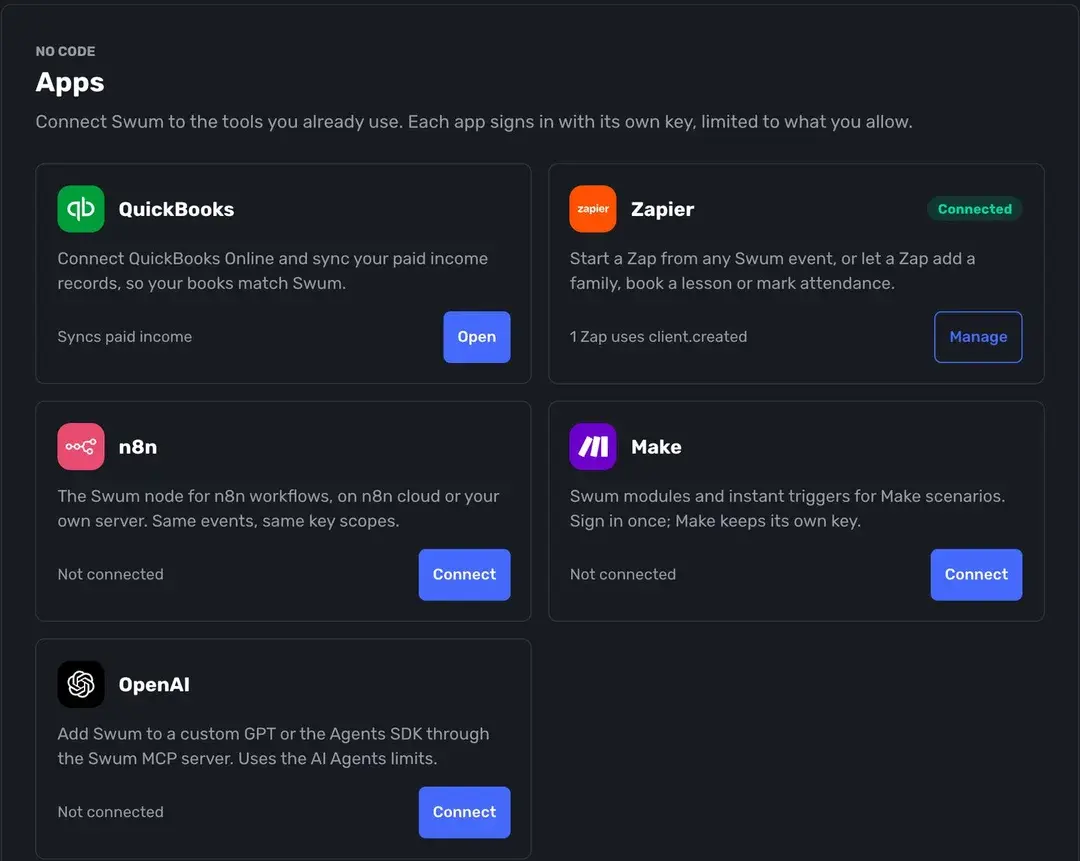
Lessons and classes flow to Google, Apple or Outlook.
Signed events for bookings, payments, attendance, waivers and more.
Money, pricing and cancellations always wait for your OK.
Under Sync Calendars, sign in with Google to add your lessons and classes to Google Calendar, or add a calendar link to Apple Calendar, Outlook or any app that takes one. Families can do the same for their own lessons. When a lesson is canceled, the event updates.
Sync is one way, from Swum to your calendar, so events you add elsewhere do not block your Swum times. Block those in your availability too. Calendar sync works on every plan.
Connect QuickBooks Online and every new payment in Swum becomes a Sales Receipt in QuickBooks, under a customer Swum finds or creates by name. A refund voids that receipt, or adds a Refund Receipt when QuickBooks will not void it, and duplicates are skipped, so your books match Swum.
It sends paid income and refunds from Swum to QuickBooks. It does not sync expenses, payroll or QuickBooks Desktop.
Start a Zap from any Swum event, or let a Zap add a family, book a lesson or mark attendance. Make gets Swum modules and instant triggers, and n8n has a Swum node you can run on your own server or connect from n8n Cloud. Each app signs in with its own key, limited to the areas you allow. The Zapier and Make apps install from a private invite inside Swum.
Swum runs an MCP server, so an AI assistant can read and work in your school. Add Swum to Claude, or to a custom GPT or the OpenAI Agents SDK. The assistant opens a Swum sign-in, and you pick the school, the locations, the areas it can touch and how much it may do on its own: Read Only, Ask Me First (the default) or Can Act.
Money actions, pricing and staff permission changes, deleting families, cancellations and messages to families always wait for your approval in Swum, and an assistant can never change your payout bank, your Swum subscription or a family's saved cards. You see what each one did, undo where supported, and disconnect it anytime. This is different from Swummy, the assistant built into Swum.
Build your own connections with the Swum REST API. Each API key picks its areas (families, classes, lessons, attendance, payments, progress, waivers, leads, reports and more), each set to None, Read or Read & Write. Webhooks send 17 events, from lesson.booked and payment.failed to waiver.signed and level.advanced, signed with HMAC SHA-256 and retried up to 8 times. The reference is in the Swum API docs.
Connect GoHighLevel and new contacts with your lead tag show up in Swum as leads, with their swimmers. Swum sends new families, bookings, payments, cancellations and completed lessons back to GoHighLevel, including package balances and a re-enrollment signal when a family has two lessons left. A sync log shows every change. GoHighLevel is on Swum Enterprise.
Your own website form can send registrations straight into Swum, to checkout or as a lead. Tracked links keep the UTM tags, Google and Facebook click IDs and ad IDs with each booking, and can fire Meta Pixel and Google Ads conversion events when someone completes a public booking.
Upload clients from a CSV file, or use Switch to Swum to bring families over from Jackrabbit, Acuity or a spreadsheet on your own, or from iClassPro and SportsEngine on request. Export lessons, earnings and clients to Excel, export leads as a CSV (including a Mailchimp format), and forward inquiry emails to your own leads address. Payments and payouts run through Stripe. See the migration checklist.
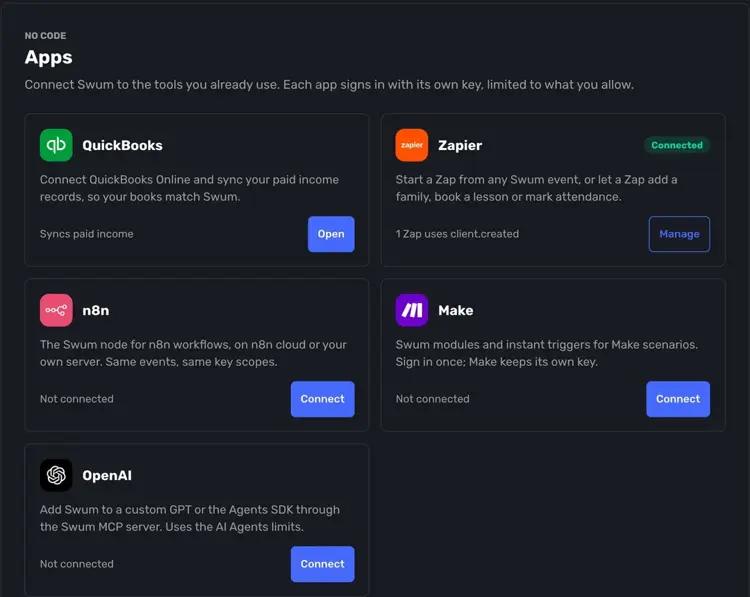
QuickBooks, Zapier, Make, n8n and OpenAI, each with its own key and limits.

Lessons and classes appear in Google, Apple or Outlook.
Google Calendar, Apple Calendar and Outlook.
Paid income and refunds sync to your books.
Automations triggered by Swum events, or that act in Swum.
Claude and other MCP apps, with your approval.
A REST API and 17 signed webhook events.
Get your data in and out without asking.
Discover how Swum can transform every aspect of your swim instruction business
REST API, webhooks and the MCP server reference.
API, webhooks, AI agents and automations for larger schools.
Monthly tuition, autopay and invoices, with QuickBooks Online in beta.
See the complete platform for swim schools, aquatic centers, and growing lesson programs.
Automate availability, booking, payments, reminders, and parent self-service.
Compare Swum plans, platform fees, and enterprise pricing for higher-volume operators.
Yes. QuickBooks Online sync is in beta. Each payment in Swum becomes a Sales Receipt in QuickBooks, and refunds are recorded too. It does not sync expenses or payroll.
Yes. Swum adds your lessons and classes to Google Calendar, and Apple Calendar and Outlook can subscribe with a link. Sync is one way, from Swum to your calendar, on every plan.
Yes, on Swum Enterprise. Start a Zap from any Swum event, or let a Zap add a family, book a lesson or mark attendance. Make and n8n are supported too.
Yes, on Swum Enterprise. Swum runs an MCP server that Claude, a custom GPT or the OpenAI Agents SDK can use. You choose what the assistant can see and do, and money, pricing and cancellations always wait for your approval.
Yes. Swum Enterprise includes a REST API with scoped keys and 17 signed webhook events. The reference is at swum.ai/developers.
Yes. Upload clients from a CSV file, or bring families over from Jackrabbit, Acuity or a spreadsheet on your own, and from iClassPro or SportsEngine on request. You can export lessons, earnings and clients to Excel at any time.
Bring booking, scheduling, payments, communication, and swim lesson operations into one platform.
Get Started