Can families book a swim evaluation online?
Yes. Families new to your school see "Book a Free Swim Evaluation" when they book, pick one of your evaluation pools and an open time, and add up to 10 swimmers.
New families book a free evaluation, your coach scores each skill, and the family gets an invite to the class that fits, all in Swum.
Get Started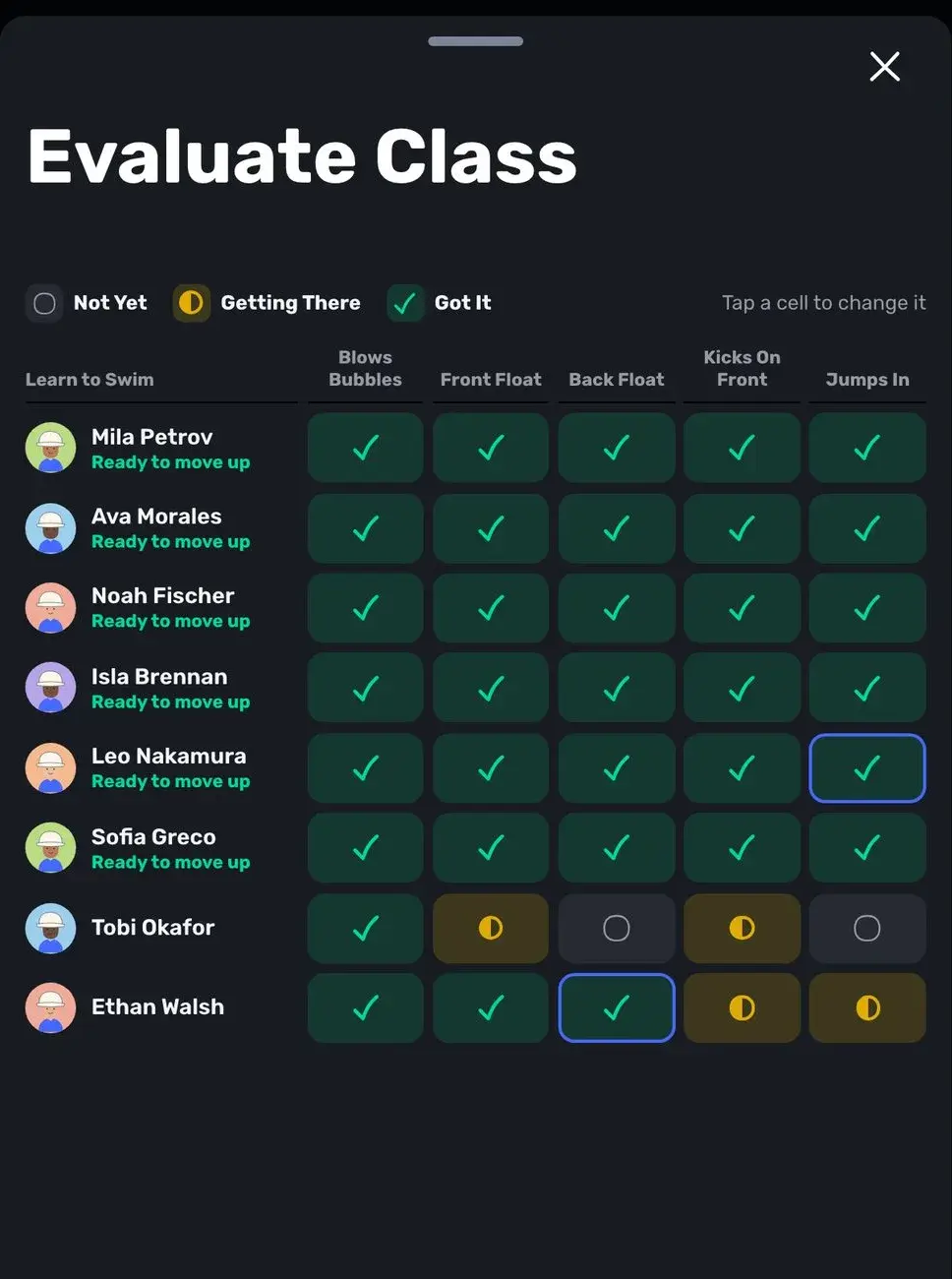
New families book a short first swim with a coach at no charge.
Not Yet, Getting There or Got It, for every key skill in the level.
Send the family a class at the right level with an open spot.
Turn on Swim Evaluation in your pricing settings and choose the length, the pools and the coaches who evaluate. Evaluations are free. A family new to your school then sees "Book a Free Swim Evaluation" as the first option when they book, picks one of your evaluation pools and an open time, and adds their swimmers.
Swum books the coach they picked if that coach is free, and otherwise finds another evaluator at that pool and time. The booking also moves the family along your leads pipeline to Evaluation Booked, so the front desk can see who is coming in.
With Required for New Families on, group classes show as "After Evaluation" until each swimmer has been evaluated, and Swum checks the rule again at checkout, so it cannot be skipped. Checkout names the swimmer who still needs one.
The rule applies to families who join after you turn it on and to anyone still in your leads pipeline. Families already on your client list, swimmers who were already evaluated, and swimmers you imported with a level are not asked. Private lessons are not blocked.
Open the evaluation from the lead or from the lesson itself. The Evaluation sheet shows the swimmer's suggested level and its key skills. Score each one Not Yet, Getting There or Got It, add a note the family will read, and Swum recommends a class tagged with that level that has an open spot, at the evaluation's pool first. Change it if you know better.
Send Enrollment Invite puts a class enrollment request in the family's Swum messages, or emails it if they have no account yet. It never charges or enrolls anyone on its own: the family accepts and pays. Saving the evaluation stores the scores on the swimmer's progress record, moves the lead to Evaluated, and places the swimmer in the matching age or skill group if your groups are matched to levels.
For swimmers already in a class, Evaluate Class opens a grid with swimmers down the side and the level's skills across the top. Tap a cell to move it from Not Yet to Getting There to Got It. A swimmer with every skill at Got It shows "Ready to move up", and Save All saves the whole class at once.
Turn on Passport Stamps & Certificates and each family gets a Swim Passport for every swimmer: a stamp for each level, the current level's skills with their scores, dates and the coach's short notes. The first stamp records the evaluation. When every skill is Got It, the family sees that their swimmer is ready for the next level.
Staff see a Ready to Move Up card listing those swimmers. Move Up advances them and moves their group with them, and Swum prepares a Certificate of Achievement with your school's logo, the level's skills and coach signatures. The family is notified in the app and by email, and can print or share it.
Match each age or skill group to a progress level and keep them in sync, so placing a swimmer sets their level and finishing a level moves them to the next group. With Only Their Placed Group on, a placed swimmer can only book their group's classes and plans. See progress tracking for levels, milestones and lesson notes.
On Swum Enterprise, SwumAI class matching suggests the best class for each swimmer from your levels, each class's level, the swimmer's age and their answers to your intake questions, and shows families a match percentage. You can tell it what to prioritize in plain words, such as filling emptier classes first.
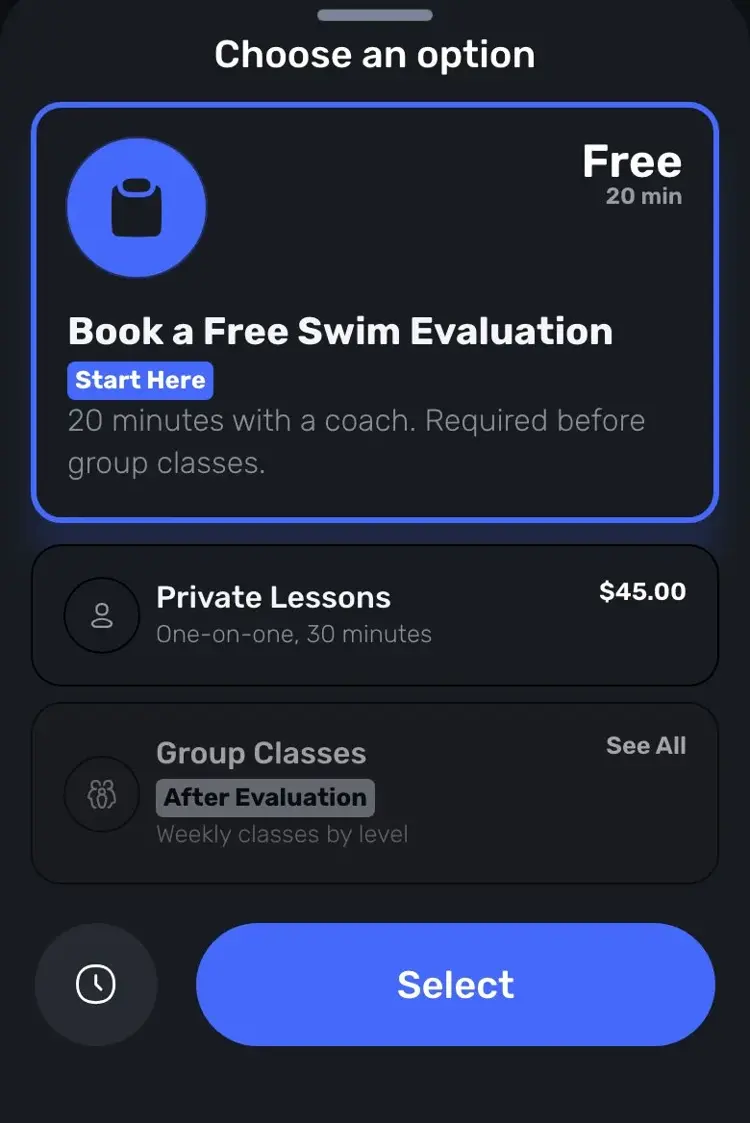
A free evaluation is the first option new families see, and classes unlock after it.
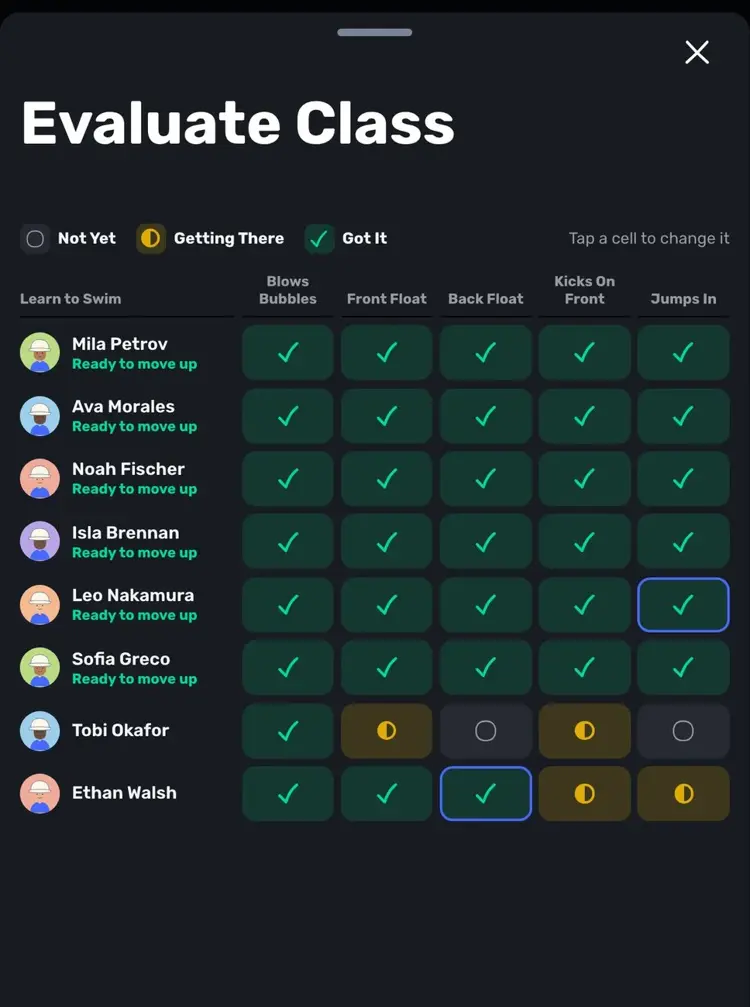
Tap through each swimmer's skills and see who is ready to move up.

Build your own levels and skills, and track each swimmer through them.
New families book a short first swim with a coach.
Group classes unlock once each swimmer is evaluated.
Score each key skill of the level in three steps.
Swum recommends a class at that level with an open spot.
Stamps, skills and certificates families can see.
Enterprise schools get a best-match class for each swimmer.
Discover how Swum can transform every aspect of your swim instruction business
Levels, milestones, lesson notes and what families see.
Online sign-up with intake questions, waivers and registration fees.
The leads pipeline from New to Evaluation Booked to Enrolled.
See the complete platform for swim schools, aquatic centers, and growing lesson programs.
Automate availability, booking, payments, reminders, and parent self-service.
Compare Swum plans, platform fees, and enterprise pricing for higher-volume operators.
Yes. Families new to your school see "Book a Free Swim Evaluation" when they book, pick one of your evaluation pools and an open time, and add up to 10 swimmers.
Yes. With Required for New Families on, group classes stay locked until each swimmer is evaluated, and Swum checks it at checkout. It applies to families who join after you turn it on. Private lessons are not blocked.
No. Swim evaluations in Swum are free.
Score each skill, and Swum recommends a class at that level with an open spot. Send Enrollment Invite sends it to the family, who accepts and pays. If your groups are matched to levels, the swimmer is placed in that group too.
Yes, with Passport Stamps & Certificates on. When you move a swimmer up, Swum prepares a Certificate of Achievement with your logo, and the family can print or share it from the app.
Scoring skills, levels, the Swim Passport and certificates use Progress Tracking, which is on Swum Pro Max ($200 a month) and Enterprise. SwumAI class matching is on Enterprise.
Bring booking, scheduling, payments, communication, and swim lesson operations into one platform.
Get Started