Last updated: November 2026 · By Ben Gorski, founder of Swum
The short answer
Most swim school software doesn't run payroll the way Gusto or ADP do. It works out what each instructor earned. That covers hours, lessons taught, cancellations that still pay, and travel. Then it hands that number to whoever pays them. Tax withholding and W-2s still come from a payroll provider or your accountant.
So when a tool says "payroll," ask what it actually does:
- Pay rates: hourly, per lesson, or different rates for private, semi-private and group lessons.
- Hours: a time clock, plus a way to approve hours before pay day.
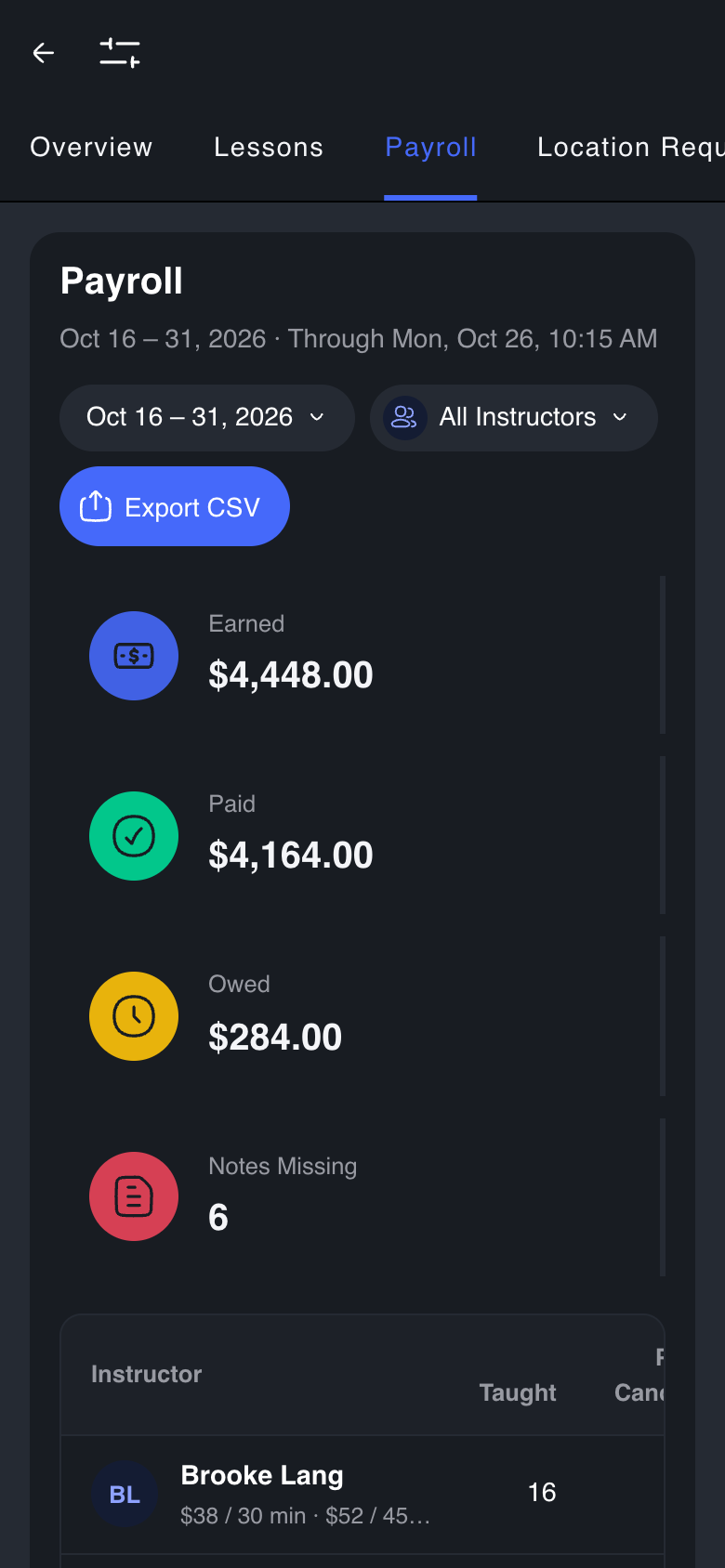
- The pay-period report: earned, already paid, and still owed, per instructor.
- Payouts: does the software send the money to contractors, or just report it?
- Taxes: does it withhold and file? (Swim school tools almost never do.)
How Swum handles instructor pay
In the Swum app (swum.ai), pay comes from the lessons themselves, so nobody has to rebuild hours from the calendar.
- Pay rates:
- Each instructor has an hourly rate, with travel surcharges for mobile lessons.
- A lesson pays (minutes ÷ 60) × the hourly rate, plus surcharges.
- Rates can differ by instructor.
- Time clock:
- Staff clock in and out.
- In Settings → Swim School → Time & Attendance, a manager approves finished shifts with Approve for payroll. That locks them until a manager undoes it.
- Nobody can approve their own time.
- Payroll view:
- Analytics → Payroll shows each instructor's lessons taught, paid cancellations, makeups, earned, paid and owed for the pay period.
- It also flags lessons with missing notes.
- Pay periods can be weekly, every two weeks, twice a month (the default) or monthly, set in Settings → Contractors → Pay Period.
- Export the period to CSV, either as a summary or lesson by lesson with clock-in times. Mark it paid with Mark Period Paid.
- It's for swim schools, and is visible to the owner and admins with financial access.
- Contractor payouts:
- Contractors are paid from the school's Swum balance to their own connected bank account through Stripe.
- With Automate Payments on, each lesson pays out shortly after it's finished. With it off, pay builds up as a balance and the school pays it when it chooses.
- Approve Lessons Before Payout holds each finished lesson's pay until an admin approves it.
- There's no single "pay everyone" button: manual payouts go one instructor at a time.
- W-2 employees:
- Mark them as employees whose pay runs through your own payroll provider.
- Swum tracks their hours and lessons, and you take the CSV to Gusto, ADP or your accountant.
- What Swum doesn't do:
- It doesn't withhold taxes, run W-2 payroll or file payroll taxes.
- Your payroll provider does that.
How other swim school tools handle it
None of the tools below says on its own pages that it pays staff or files payroll taxes. Each one tracks hours or works out pay, then hands the numbers to a payroll provider.
- Jackrabbit Class:
- Jackrabbit's Time Clock records hours and shows an estimated gross wage, at no extra fee.
- Jackrabbit's help center says the Time Clock doesn't apply overtime, withholding, deductions or payroll taxes, and doesn't process payroll.
- Jackrabbit exports hours to Express Payroll (for Express Payroll clients), QuickBooks Desktop or CSV.
- iClassPro:
- iClassPro's pricing page lists a Staff Time Clock in its Signature, Elite and Premium plans.
- iClassPro's help center says its Time Clock exports hours to ADP, QuickBooks Online, Express Payroll Services or a generic CSV, and doesn't replace a full HR system.
- WellnessLiving:
- WellnessLiving calculates pay from six rate types: session, client, tiered client, hourly, commission and tiered group.
- WellnessLiving can use its time clock for hourly pay, and its Payroll Summary Report shows total pay, tips, commissions and hours.
- WellnessLiving says its reports export in formats that work with ADP, Paychex and QuickBooks.
- Pike13:
- Pike13 calculates pay owed from flat, commission and attendance-bonus rates and exports CSV for payroll software.
- Pike13 says it doesn't move money, so you pay staff outside Pike13.
- Pike13 has no time clock; for hourly staff, its help center suggests using scheduled hours.
- Pike13's payroll is on its Premium and Advanced plans.
- Swum:
- Swum works out pay from lessons and approved hours, and exports each pay period to CSV.
- Swum also pays contractors directly through Stripe.
- Like the others, Swum doesn't file payroll taxes.
The real difference between these tools is what happens after the pay is worked out. Most hand you a file. With Swum, contractors can be paid without a separate step.
Which setup fits
- All 1099 contractors, paid per lesson: pick software that pays contractors directly. That way pay day isn't a spreadsheet. In Swum that's Automate Payments.
- W-2 instructors: you still need Gusto, ADP or similar. Pick the tool whose hours and pay export your provider can take without retyping. Swum exports a CSV per pay period.
- A mix: keep both. Pay contractors in the software and send employees' approved hours to payroll.
For the hiring side (1099 vs W-2, what to pay, where to find instructors), see How to hire and pay swim instructors.
FAQ
Does swim school software run payroll?
Mostly not in the tax sense. Tools like Swum work out pay from lessons and hours, and Swum can pay contractors directly. Tax withholding and W-2s still need a payroll provider.
Can Swum pay my instructors?
Yes, for contractors. Swum pays them from your Swum balance to their own bank account through Stripe, either after each lesson or when you choose. Employees on W-2 are paid through your payroll provider, using Swum's hours and pay export.
Does Swum have a time clock?
Yes. Staff clock in and out, and managers approve finished shifts for payroll in Time & Attendance.
Can I export payroll from Swum?
Yes. Analytics → Payroll exports each pay period to CSV, as a summary or lesson by lesson.
Does Swum file payroll taxes or W-2s?
No. Swum doesn't withhold or file payroll taxes.
Sources (competitor facts, checked Nov 15, 2026)
- Jackrabbit, "Time Clock Overview": https://help.jackrabbitclass.com/help/time-clock-overview
- Jackrabbit, "Export to Express Payroll": https://help.jackrabbitclass.com/help/manage-the-time-clock-step-4-export-to-express-payroll, and "Time Clock": https://help.jackrabbitclass.com/help/time-clock
- iClassPro pricing: https://www.iclasspro.com/pricing
- iClassPro, "What is the Time Clock?": https://support.iclasspro.com/hc/en-us/articles/360005771213-What-is-the-Time-Clock
- WellnessLiving, "Types of pay rates": https://help.wellnessliving.com/en/articles/11023782-types-of-pay-rates
- WellnessLiving, "The time clock": https://help.wellnessliving.com/en/articles/8977363-the-time-clock
- WellnessLiving, "Payroll Summary Report": https://help.wellnessliving.com/en/articles/10670409-payroll-summary-report
- WellnessLiving, "Manage staff": https://www.wellnessliving.com/features/manage-staff/
- Pike13, "Running Payroll": https://help.pike13.com/hc/en-us/articles/205838603-Running-Payroll
- Pike13, "How do I pay hourly employees?": https://help.pike13.com/hc/en-us/articles/13772905593485-How-do-I-pay-hourly-employees